Letter it here, and stop finishing your work somewhere else
The lettering editor got eleven fonts, forty-seven sounds and ten bubble shapes, and what you letter stays editable. Covers and banners can carry text at last. Inky shows you the art it makes, and the promo kit comes cut for every platform.
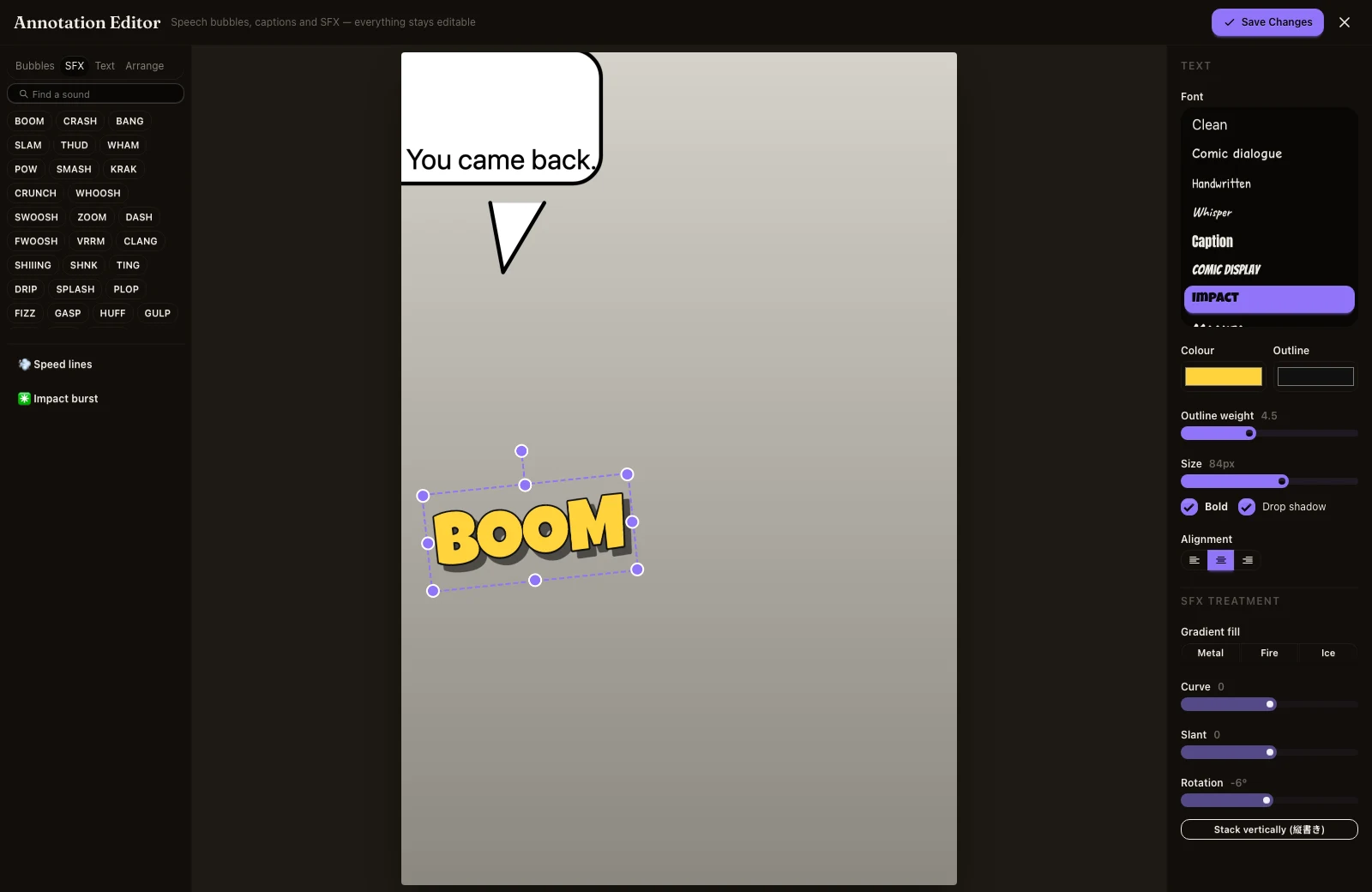
What shipped. The parts of finishing a page that used to send you to another app.
- What you letter stays editable. Add speech bubbles to a page, save, close the editor, and re-open it: every bubble is still there, still selectable, still retypable, sitting on the original artwork rather than baked into a picture of your last save. Before this, a saved page was finished forever and a typo meant starting again. The page menu says "Edit the lettering" once a page has some.
- Eleven fonts instead of one. Comic dialogue, handwritten, whisper, caption, comic display, impact, marker, signage, horror, and a Japanese face for manga work, alongside the plain one. Each row in the picker is drawn in its own face so you pick by eye. All of them are free for commercial use and yours to publish with.
- Forty-seven sounds, and ten bubble shapes. BOOM, CRASH, SHIIING, ドドド and the rest drop straight onto the page — as ordinary text you can retype, not stickers. Outline weight, drop shadow, metal, fire and ice fills, curve, slant, rotation, vertical stacking, speed lines and impact bursts. Bubbles went from four to ten: burst, whisper, robotic, linked, off-panel, and a tail you can drop on its own and point at whoever is speaking.
- Covers and banners can carry text. Two things were wrong here. You could not letter them by hand at all — the editor only ever opened on chapter pages — and when you asked for a title in the words of your prompt, the request never reached the image model. The generator was being told, on every cover, to draw no chapter titles and no written content of any kind, so it obeyed. Both are fixed: "Add text to the cover" opens the same editor you use on pages, and asking for a title now puts the exact words you chose on the artwork.
- Inky shows you what it made. Covers, banners, pages, and your character, prop and location sheets now appear in the conversation as pictures. Tap one to see it full size, or open the panel it belongs to. You no longer have to go looking for the cover you just paid for.
- Inky fills in sheets as your story needs them. When it is about to draw beats that name a character, an object or a place with no sheet, it writes one first, with real appearance notes and the names your beats actually use. Writing a sheet is free and happens without asking. Drawing its picture still costs credits and still waits for you to press the button.
- The promo kit has five designs and seven sizes. Square, tall, vertical, link card, wide, header and cover, each cut for where it is posted rather than one image squeezed everywhere, and you can take a whole platform's set in one download instead of picking files one at a time.
Why it matters. Lettering is the last step before a page is finished, and until now it was the step most likely to send you to another tool and not bring you back: one font, four bubbles, no sound effects worth the name, and no way to fix a typo once you had saved. A cover that could not carry its own title had the same effect. None of this makes your art better on its own, but all of it decides whether the last hour of a chapter happens here.