creation
Undo and Delete always in reach, and every page change can be taken back
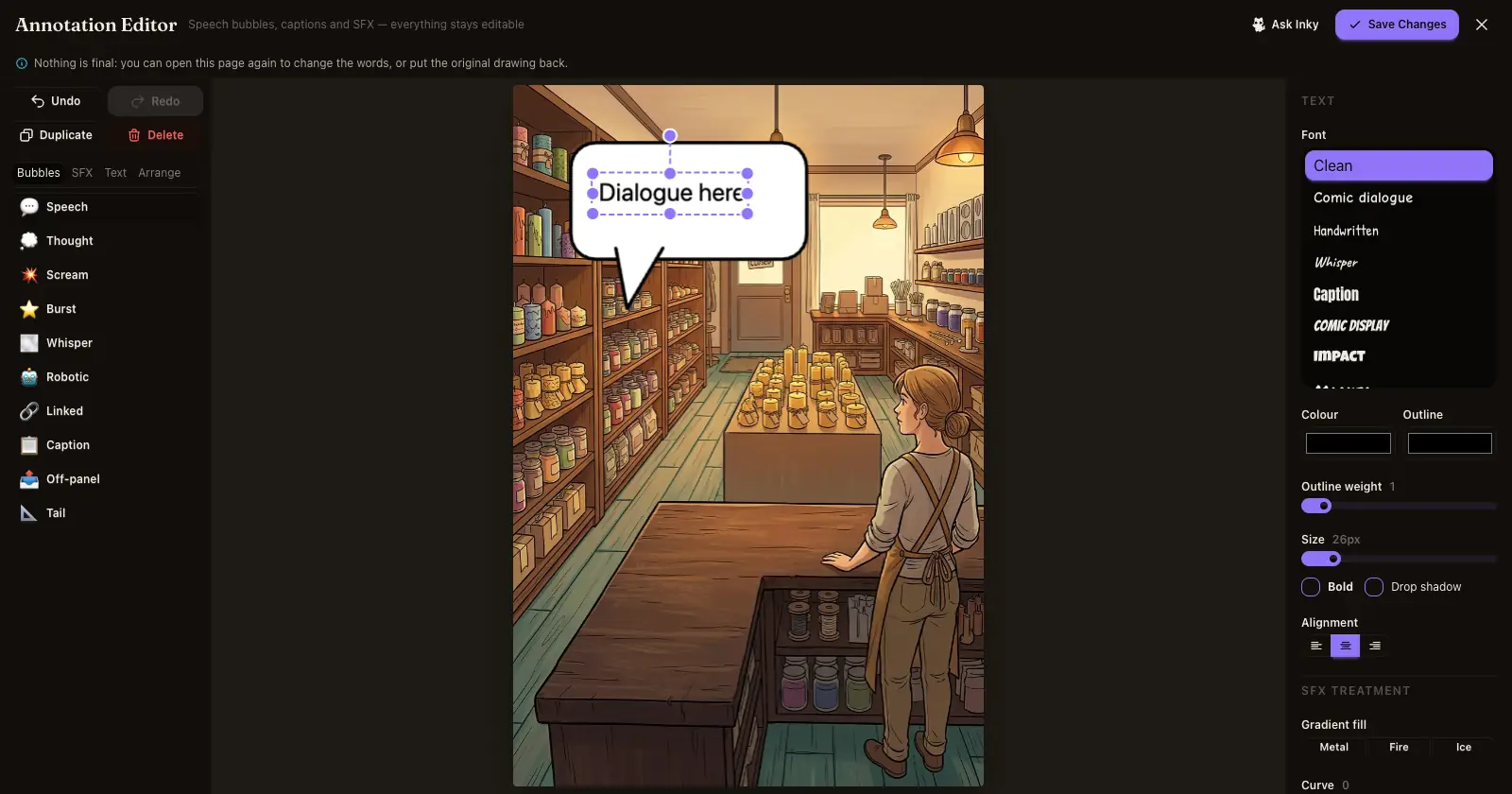
In the lettering editor, Undo, Redo, Duplicate and Delete now sit above every tab, and the Delete key removes what you selected. A page you lettered, fixed or redrew can go back to how it was from its ⋯ menu.
What shipped.
- Lettering editor. Undo, Redo, Duplicate and Delete sit in a bar above the tabs, on every tab and on phones. Select a bubble, a caption or a sound effect and press Delete or Backspace to remove it. New bubbles now land on the page with their tail attached.
- Fix an area. Undo and Clear sit right above the picture. Tap a circle and press its × to remove just that one. You can circle up to four areas, and the editor tells you when you have reached four.
- Take it back. After you letter a page, keep an area fix or keep a redraw, the page's ⋯ menu and the full-size view offer the earlier version: Revert to original, Revert to before the fix or Revert to the earlier drawing. Nothing is thrown away, so the same menu swaps back again. It is free, and it works while you can still edit the chapter.
Why it matters. Trying something should never feel risky. Every change you make to a page can be undone, and the buttons that undo it are always on screen.